or
5 answers
638 views
Stuck at download either choice add other items or leave as included, but still stuck at downloading step 114 MB... Tried to uncheck VS 2013 and 2017 then included 2013 and 2017, nothing go far...
Thank you

Nikolay Mishev
Telerik team

answered
on
28 Mar 2019
6 answers
237 views
The message I am getting is 'Unexpected error has occurred' and on the next line 'Failed to receive data from Telerik web service'. I ran this yesterday with no problems (and have been for a long time). Are you having issues with your service?
Vesko
Telerik team
answered
on
21 Jan 2019
6 answers
304 views
After running the upgrade to a new version, the Control Panel shows a blank window. Tried to uninstall everything and downloaded the latest version of it, same result, not able to install / update existing products.
Running Windows 10 Pro - 1809.
Any clues on how to fix it?
Drewanz
Top achievements
 Rank 1
 Veteran
Rank 1
Veteran
answered
on
20 Nov 2018
4 answers
183 views
Hi,
i have a require to show additional data in the second column of grid based on some condition if status is submitted than shoe expand plus image on lick of that display some more information in the same grid inserting new div and change imaged to collapse minus sign. find attachment for UI requirement. please reply ASAP.
Regards,
Shobha

Attila Antal
Telerik team
answered
on
14 Nov 2018
12 answers
174 views
I'm running VS2017 on Windows 10 Pro.
I have Telerik Control Panel 17.3.814.1 installed according to "Programs and Features" in Windows Control Panel.
I received popup notifications that new versions of my installed Telerik tools were available.
However, when I go into Telerik Control panel, the UI provides no clear indication that any updates are available nor how I should go about installing the updates.
There is not "Update" button in Telerik Control Panel.
Did the process for updating Telerik products change sometime in the last year or so ?
Krasimir
Top achievements
Rank 1
Rank 1
answered
on
26 Jun 2018
0 answers
313 views
Hi guys,
Some of you may have encountered a bug in Progress Control Panel when you install, update or modify a product. The application stops working when you click on the "Proceed" button and an error dialog appears. The problem is now fixed so you just have to remove the old version of the Control Panel and install the latest one.
Please feel free to let us know if you need additional assistance.
Regards,
the Telerik team
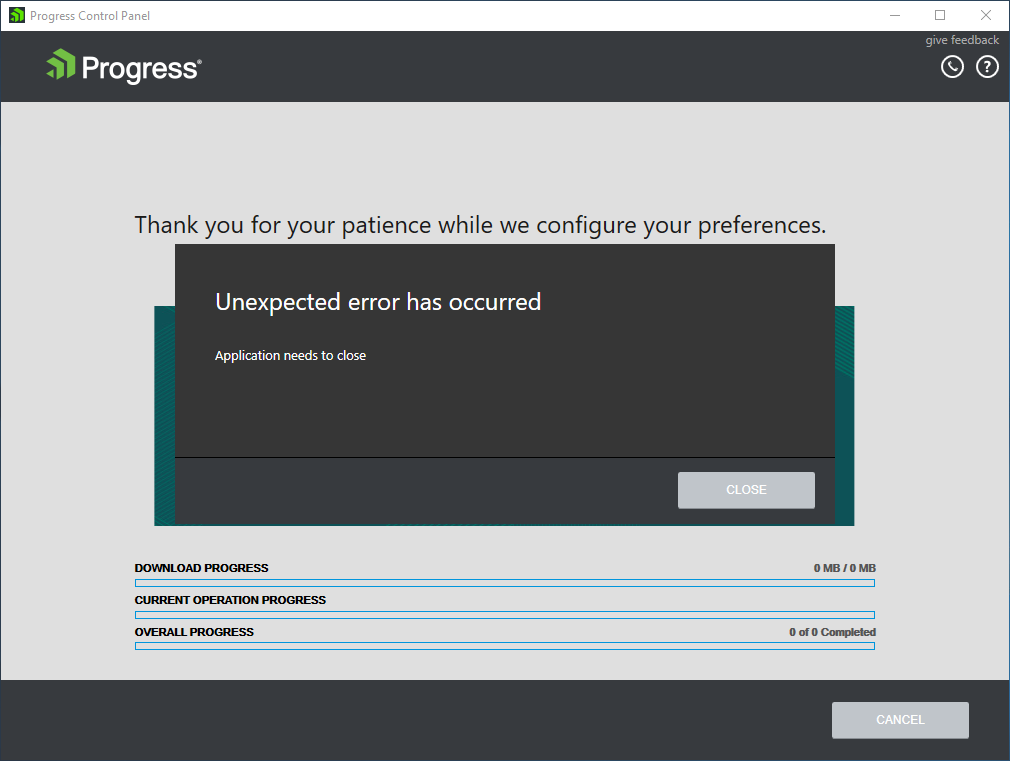
Some of you may have encountered a bug in Progress Control Panel when you install, update or modify a product. The application stops working when you click on the "Proceed" button and an error dialog appears. The problem is now fixed so you just have to remove the old version of the Control Panel and install the latest one.
Please feel free to let us know if you need additional assistance.
Regards,
the Telerik team

Telerik Admin
Top achievements
Rank 1
 Iron
Iron
Rank 1
Iron
asked
on
28 May 2018
2 answers
160 views
Hi,
I have just installed Visual Studio 2017. When I try to install any of my previous
components (WPF, Winform, AJAX etc…) via the control panel it goes through the
download process but then errors.
The error it gives is ‘Notify Visual Studio to merge the
Visual Studio packages failure.’
I’m using the latest verison of the contol panel and version
2017.1.221 of the component.
Please help (urgently).
Developer
Top achievements
Rank 1
Rank 1
answered
on
20 Mar 2018
0 answers
183 views
I have RadGrid columns (gridboundcolumn) through out the application and we want to apply a property/attribute to all the columns at application/config file level. So that we do not need to go to each and every line of columns and add the property or attribute.
Is there any way we can able to set the property at application level or config level?
David
Top achievements
Rank 1
Rank 1
asked
on
27 Feb 2018
2 answers
2.8K+ views
Hi,
I was trying to update my installed Telerik products using "Progress Control Panel for Windows" yesterday. But for some reason it never finished updating. It downloaded everything but the progress bar said uninstalling but it never finished (after hours). So I closed the application and tried to uninstall each component one by one. First through the Progress Control Panel and then through Windows Programs Add & Remove. Some of the products were uninstalled but some hasn't. I can't seem to install a newer version either. It hangs up as well.
Is there a way I can uninstall everything and install it fresh? I am frustrated and this is not allowing me to finish my work which is on a deadline.
Please kindly assist ASAP. I am a paid subscribed customer but since this is not product specific, I don't know where to raise the Support Ticket for this issue.
Kind Regards,
JB
JB
Top achievements
Rank 1
Rank 1
answered
on
30 Jan 2018
4 answers
676 views
When I run the version of the Telerik Control Panel that I've downloaded from my account page (ProgressControlPanelSetup_2017_3_1002_3.exe), it runs the Control Panel, but the Control Panel doesn't actually get installed on my computer. This means that I have to keep this exe sitting on my desktop and run it from there every time. Can someone help? This is what the install log says:
The following properties have been set:
Property: [AdminUser] = true {boolean}
Property: [InstallMode] = HomeSite {string}
Property: [ProcessorArchitecture] = AMD64 {string}
Property: [VersionNT] = 6.2.0 {version}
Running checks for package 'Windows Installer 3.1', phase BuildList
The following properties have been set for package 'Windows Installer 3.1':
Running checks for command 'WindowsInstaller3_1\WindowsInstaller-KB893803-v2-x86.exe'
Result of running operator 'VersionGreaterThanOrEqualTo' on property 'VersionMsi' and value '3.1': true
Result of checks for command 'WindowsInstaller3_1\WindowsInstaller-KB893803-v2-x86.exe' is 'Bypass'
'Windows Installer 3.1' RunCheck result: No Install Needed
Running checks for package 'Microsoft .NET Framework 4 (x86 and x64)', phase BuildList
Reading value 'Version' of registry key 'HKLM\Software\Microsoft\NET Framework Setup\NDP\v4\Full'
Read string value '4.7.02053'
Setting value '4.7.02053 {string}' for property 'DotNet40Full_TargetVersion'
The following properties have been set for package 'Microsoft .NET Framework 4 (x86 and x64)':
Property: [DotNet40Full_TargetVersion] = 4.7.02053 {string}
Running checks for command 'DotNetFX40\dotNetFx40_Full_setup.exe'
Result of running operator 'VersionGreaterThanOrEqualTo' on property 'DotNet40Full_TargetVersion' and value '4.0.30129': true
Result of checks for command 'DotNetFX40\dotNetFx40_Full_setup.exe' is 'Bypass'
'Microsoft .NET Framework 4 (x86 and x64)' RunCheck result: No Install Needed
Launching Application.
Will attempt to elevate process.
Running command 'C:\Users\XXXX\AppData\Local\Temp\7zS8436FF8B\ProgressControlPanel.exe' with arguments ''
Emily
Top achievements
Rank 1
Rank 1
answered
on
06 Oct 2017











