or
0 answers
26 views
Hello Telerik Team,
I am currently working with TreeListView in a WPF application and I am facing an issue related to row background color overriding when a row is selected.
In my application, certain rows need to have a custom background color depending on their type (for example: LocalFile and RemoteFile). The custom color works correctly when the row is not selected.
However, when the row is selected, the default RadTreeListView selection background color overrides the custom color, and the File-specific color is no longer visible.
My goal is to preserve the custom background color when the row is selected.
Below is a simplified version of the style currently used:
<Grid.Resources>
<Style TargetType="telerik:TreeListViewRow">
<!-- Default row color based on data -->
<Setter Property="Background">
<Setter.Value>
<Binding Path="FileSource">
<Binding.Converter>
<converter:SourceTypeToColorConverter/>
</Binding.Converter>
</Binding>
</Setter.Value>
</Setter>
<Setter Property="MouseOverBackground" Value="LightBlue"/>
<Style.Triggers>
<!-- Default selected row color -->
<Trigger Property="IsSelected" Value="True">
<Setter Property="Background" Value="LightBlue"/>
</Trigger>
<!-- Selected color for local files -->
<MultiDataTrigger>
<MultiDataTrigger.Conditions>
<Condition Property="IsSelected" Value="True"/>
<Condition Binding="{Binding FileSource}" Value="LocalFile"/>
</MultiDataTrigger.Conditions>
<Setter Property="Background" Value="LightGreen"/>
</MultiDataTrigger>
<!-- Selected color for remote files -->
<MultiDataTrigger>
<MultiDataTrigger.Conditions>
<Condition Property="IsSelected" Value="True"/>
<Condition Binding="{Binding FileSource}" Value="RemoteFile"/>
</MultiDataTrigger.Conditions>
<Setter Property="Background" Value="LightYellow"/>
</MultiDataTrigger>
</Style.Triggers>
</Style>
</Grid.Resources>The issue occurs when the row becomes selected. The control applies the default selection background, which overrides these custom styles.
Could you please advise on the recommended way to maintain custom row background colors for specific items even when they are selected in TreeListView?
Any guidance or best practice would be greatly appreciated.
Thank you.

Rajdeep
Top achievements
 Rank 1
Rank 1
asked
on
12 Mar 2026
1 answer
42 views
In a RadLayoutControl I use LayoutControlTabGroup.
I can set the background of the Item's but not on the "empty" space, is there some way to do that.
<telerik:RadLayoutControl >
<telerik:LayoutControlTabGroup Background="White">
<telerik:LayoutControlTabGroupItem Header="Tab 1" Background="Red">
<Button Content="Item 1" />
</telerik:LayoutControlTabGroupItem>
<telerik:LayoutControlTabGroupItem Header="Tab 2" Background="Blue">
<Button Content="Item 2" />
</telerik:LayoutControlTabGroupItem>
</telerik:LayoutControlTabGroup>
</telerik:RadLayoutControl>
Stenly
Telerik team

answered
on
04 Mar 2026
0 answers
33 views
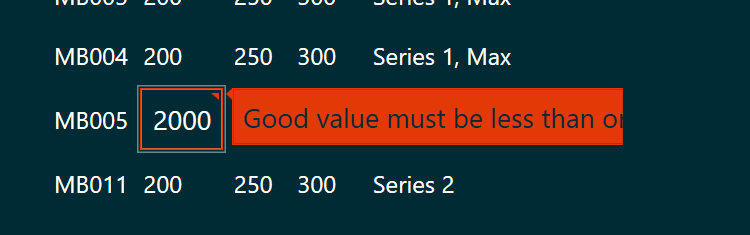
I have a RadGridView and I have implemented IDataErrorInfo on the view model. Unfortunately, when the user types in something invalid and an error appears, the message is cut off. I want to style it -- style... something -- so that the full error message will show. But I don't know what property to set or what to style
1 answer
92 views
This is how my RadStepProgressBar appears for some of the steps.
When I change the Height (or StepSpacing or Margin) of the RadStepProgressBar control in XAML hot reload, the appearance corrects itself.
This doesn't always happen, but only sometimes. I have set the binding for the ItemsSource property of RadStepProgressBar to my steps collection, and set the SelectedIndex using binding whenever a step is completed
What am I doing wrong?
Ludwig
Top achievements
Rank 1
 Iron
Iron
Rank 1
Iron
answered
on
27 Feb 2026
1 answer
24 views
Hi,
I open a RadOpenFileDialog setting FileName with the full path of an existing file.
In the edit box in the low part of dialog I can see the path, and, if I click ok I get the file selected.
But in the list of files the path is not selected (the folder is also correctly set).
How can I select correctly the file and automatic scroll the view in order to see the seelction
Thank you
Luigi
I open a RadOpenFileDialog setting FileName with the full path of an existing file.
In the edit box in the low part of dialog I can see the path, and, if I click ok I get the file selected.
But in the list of files the path is not selected (the folder is also correctly set).
How can I select correctly the file and automatic scroll the view in order to see the seelction
Thank you
Luigi
Stenly
Telerik team
answered
on
19 Feb 2026
8 answers
455 views
Create a new WPF project, add a RadDocking to the page, then add a DocumentHost to the RadDocking, like so:
Run the app in debug mode and you'll get the following error in the VIsual Studio output window:
System.Windows.Data Error: 4 : Cannot find source for binding with reference 'ElementName=DropDownButtonElement'. BindingExpression:Path=IsChecked; DataItem=null; target element is 'DropDownMenu' (Name='DropDownMenuElement'); target property is 'IsOpen' (type 'Boolean')
Using version 2011.1.419.40. Noticed that there was a similar problem with the RadTabControl (see http://www.telerik.com/community/forums/wpf/tabcontrol/strange-error-message-in-debug-view.aspx). Can't reproduct the same error with RadTabControl. Suspect this is a similar issue. Doesn't cause any problems but would be nice to remove the error.
Can can anyone else confirm this?
<telerik:RadDocking HasDocumentHost="True">
    <telerik:RadDocking.DocumentHost>
        <telerik:RadSplitContainer>
            <telerik:RadPaneGroup>
                <telerik:RadDocumentPane Header="Document 1" Title="Document 1" />
            </telerik:RadPaneGroup>
        </telerik:RadSplitContainer>
    </telerik:RadDocking.DocumentHost>
</telerik:RadDocking>
Run the app in debug mode and you'll get the following error in the VIsual Studio output window:
System.Windows.Data Error: 4 : Cannot find source for binding with reference 'ElementName=DropDownButtonElement'. BindingExpression:Path=IsChecked; DataItem=null; target element is 'DropDownMenu' (Name='DropDownMenuElement'); target property is 'IsOpen' (type 'Boolean')
Using version 2011.1.419.40. Noticed that there was a similar problem with the RadTabControl (see http://www.telerik.com/community/forums/wpf/tabcontrol/strange-error-message-in-debug-view.aspx). Can't reproduct the same error with RadTabControl. Suspect this is a similar issue. Doesn't cause any problems but would be nice to remove the error.
Can can anyone else confirm this?
0 answers
35 views
Hi Team,
We are encountering an intermittent IndexOutOfRangeException when calling XamlFormatProvider.Export() on a RadDocument.
Exception stack:
Code:
Notes:
documentis not nullEach document is different
Same code works for most documents
The exception occurs inside Telerik export logic
Documents are exported concurrently (parallel processing)
No custom type converters or custom styles added explicitly
Questions:
Is
XamlFormatProvider.Export()thread-safe when used concurrently?Can concurrent exports cause internal state corruption (e.g. type converter dictionary)?
Is there a recommended approach for exporting
RadDocumentin parallel (e.g. synchronization or per-thread isolation)?
Any guidance would be appreciated.
Thanks.
Zafeer
Zafeer
Top achievements
Rank 1
Rank 1
asked
on
10 Feb 2026
0 answers
31 views
Hi ,
We have integrated RadRichTextBox into our WPF (C#) application and are trying to add RadCallout as a custom context menu. since the control is being created entirely in code-behind without XAML ,we are encountering implementation challenges.
Our expectation is that when a user selects text and right-clicks to choose the RadCallout option, the selected text should appear inside the callout type.Could you please guide us on how to achieve this?
John
Top achievements
Rank 1
 Iron
Iron
 Iron
Iron
 Iron
Iron
Rank 1
Iron
Iron
Iron
asked
on
05 Feb 2026
1 answer
83 views
Hello,
I have attempted to implement the solutions listed here.
We are using various ColorVariations along with our themes, however. For example:
StyleManager.ApplicationTheme = new Windows11Theme(Windows11Palette.ColorVariation.Dark);The solutions listed in the link above throw the following exception:
System.InvalidOperationException: The calling thread cannot access this object because a different thread owns it.
Is there a way to use theme ColorVariations along with RadSplashScreen?
Thank you

Nadya | Tech Support Engineer
Telerik team
answered
on
02 Feb 2026
0 answers
24 views
We have an app that has RadComboBox controls arranged above some RadNumericUpDown controls. For the RadNumericUpDown controls we have it set up to open a numeric pad on PreviewMouseUp to support both mouse and touch. The issue we have is that when a combobox item is selected that lies over a numericupdown using touch, the numericupdown control receives the focus and activates the numeric pad. This does not occur when using a mouse.
Attached is an example derived from our app that reproduces this behavior. Selecting Pounds or Newtons from the Force combobox using touch will cause a message box to appear.
Is there any way to work around this behavior? It is annoying but not a show-stopper.
Thanks,
Jim
Jim
Top achievements
Rank 1
Rank 1
asked
on
28 Jan 2026










