or
0 answers
111 views
Hi Kendo React team,
I’m using the Kendo React DatePicker with dateInput and clearButton={true}.
Here’s the behavior I’m seeing:
Initial state: The input shows the floating label (Date Start) and the placeholder (dd.MM.yyyy.).
When a value is selected: The date is shown correctly in the input.
After pressing the clear button: The input shows only the placeholder (dd.MM.yyyy.), but the floating label does not reset to the initial state.
What I would like instead is that when the clear button is clicked, datePicker should return to the exact same initial state.
I’ve attached a screenshot showing the three states (initial, selected, and after clear) for clarity.
Version is: @progress/kendo-react-dateinputs: "9.3.1"
Thanks!

Sanja Tolo
Top achievements
 Rank 1
 Iron
Iron
 Iron
Iron
Rank 1
Iron
Iron
updated question
on
18 Aug 2025
0 answers
60 views
how do i obtain git credentials for the source code? I tried the instructions but my Telerik account email and password didn't work (I entered my Telerik email and pass into the git credential manager popup):
$ git clone https://kendo.git.progress.com/kendo-react-private.git
Cloning into 'kendo-react-private'...
fatal: Authentication failed for 'https://kendo.git.progress.com/kendo-react-private.git/'
$ git clone https://kendo.git.progress.com/kendo-react-private.git
Cloning into 'kendo-react-private'...
fatal: Authentication failed for 'https://kendo.git.progress.com/kendo-react-private.git/'
Luis Lopez
Top achievements
Rank 1
Rank 1
asked
on
14 Aug 2025
1 answer
80 views
Hi,
Please see the example - https://codesandbox.io/p/sandbox/silly-wind-tpfg8n
When column "Unit Price" is locked, while moving the horizontal scroll bar, the group header is sticky (expected behavior), but the group footer is not sticky (wrong behavior).
Thanks,
Jie
Filip
Telerik team

updated answer
on
14 Aug 2025
1 answer
63 views
Hi,
`GridCellsSettings.group.groupHeader` only works when set in <Grid />, doesn't work if set in <Column />.
This works:
<Grid
    cells={{
        group: { groupHeader: GroupMyHeaderCustomCell }
    }}
>
This doesn't work:
<Grid>
    <Column
        cells={{
            group: { groupHeader: GroupMyHeaderCustomCell }
        }}
    />
</Grid>
Can you please explain the difference?
Thanks,
Jie

Vessy
Telerik team
answered
on
11 Aug 2025
1 answer
91 views
Hi All,
I'm Kamal Hinduja, was born in Chennai (India) and now resides in Geneva, Switzerland(Swiss). Can anybody explain how to apply a custom
theme to all Kendo React components?
Thanks, Regards
Kamal Hinduja Geneva, Switzerland
Alexander
Telerik team
answered
on
11 Aug 2025
1 answer
49 views
I noticed that Label component has styling based on if it is inside any kendo component, including not only layout components but Form component as well. If placed outside any of them it lacks some font styling.
Even on documentation page here body element has added k-body class in order to add proper consistent styling.
What is proper use of Label component to have consistent styling across app? I'm not using kendo layouts on every page is there a non invasive layout i can add just to apply proper styling?
Even on documentation page here body element has added k-body class in order to add proper consistent styling.
What is proper use of Label component to have consistent styling across app? I'm not using kendo layouts on every page is there a non invasive layout i can add just to apply proper styling?
1 answer
87 views
We are trying to update our React web app's Content Security Policy header to include default-src 'self'. This results in the web app failing, stating that the @progress/kendo-font-icons/dist/index.css style sheet refused to load. In other forum questions, similar issues have gotten the response to add 'unsafe-inline' or 'unsafe-eval' to the CSP configuration. This is a highly unsafe practice that would bring us out of compliance with our computer security service.
Is there any way to get Kendo stylesheets to work with CSP configurations without using unsafe-inline or unsafe-eval?

Is there any way to get Kendo stylesheets to work with CSP configurations without using unsafe-inline or unsafe-eval?
Vessy
Telerik team
answered
on
01 Aug 2025
1 answer
110 views
Title: How to Restrict Checkbox Selection to Only Checkbox Click in Kendo Grid Row Selection?
Description:
I am using the Kendo React Data Grid with row selection enabled via a checkbox column. My goal is to select a row only when the checkbox itself is clicked, not when any other part of the row is clicked.
However, currently, when I click anywhere in the row (e.g., the staff name), the checkbox also gets selected. This creates a problem in my use case — clicking the staff name navigates to the staff profile, but it also toggles the checkbox, which is unintended.
What I need:
I want the checkbox to be selected only when the checkbox is clicked, and not when clicking anywhere else in the row.
What I've tried:
I am using
selectable={{enabled: true,mode: 'multiple',drag: false,cell: false,checkboxOnly: true}}but the issue still occurs.
I have a custom cell rendering for the name column that navigates on click.
Screenshot:
Question:
How can I configure the Kendo Grid so that:
Checkbox selection is triggered only by clicking the checkbox.
Clicking on any other cell (especially with navigation) does not toggle checkbox selection?
Thanks in advance!
Alexander
Telerik team
answered
on
29 Jul 2025
1 answer
236 views
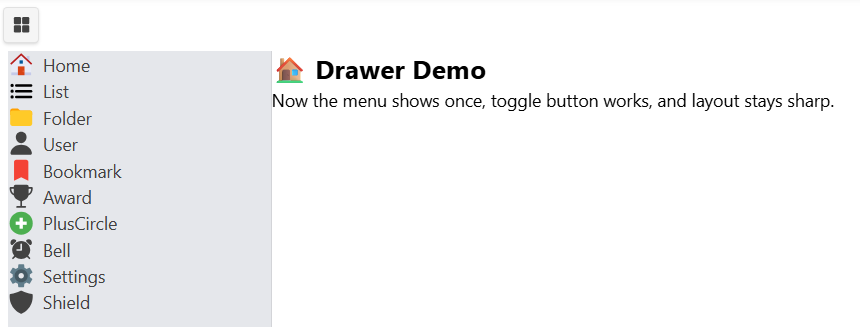
We came up with a technique that allows us to use almost any SVG icon pack.
We needed 'AI & ML' icons and flaticons_com had them under the premium license.
Our team has been spending way too much time trying to get external icon sets working with Kend React components so we did what made sense.
Please look over answer, this what we came up with. Here is the screenshot of the demo included. It uses different icon-packs "iconFamily' switching from color to black etc...
Tom
We needed 'AI & ML' icons and flaticons_com had them under the premium license.
Our team has been spending way too much time trying to get external icon sets working with Kend React components so we did what made sense.
Please look over answer, this what we came up with. Here is the screenshot of the demo included. It uses different icon-packs "iconFamily' switching from color to black etc...
Tom


1 answer
80 views
Hi Kendo Team,
I'm currently working with the KendoReact Gantt Chart and would like to customize how many dates are visible in the chart for different views (Yearly, Monthly, Weekly). Specifically, I want to control the time span shown for each view — for example:
In Yearly view, show 5 years instead of the default range
In Monthly view, limit the chart to show only 6 months at a time
In Weekly view, show just 4 weeks of data
Is there a recommended way to configure the visible date range or scale for each view mode?
Any guidance or code example would be greatly appreciated!
Thanks
Alexander
Telerik team
answered
on
25 Jul 2025











