or
0 answers
73 views
Hi
Is it possible to use keepItemsMounted for panelbar when used in drawer?
When i try to use it this way, the panel bar items will not close/collapse.
I made a stackblitz to show the problem.
Any help on this would be appreciated.
Thankyou
Neil
https://stackblitz.com/edit/react-qsacwnyt?file=app%2Fapp.tsx
0 answers
95 views
Is there any method to hide the highlighted Row and Column as shown below and attached image as well.
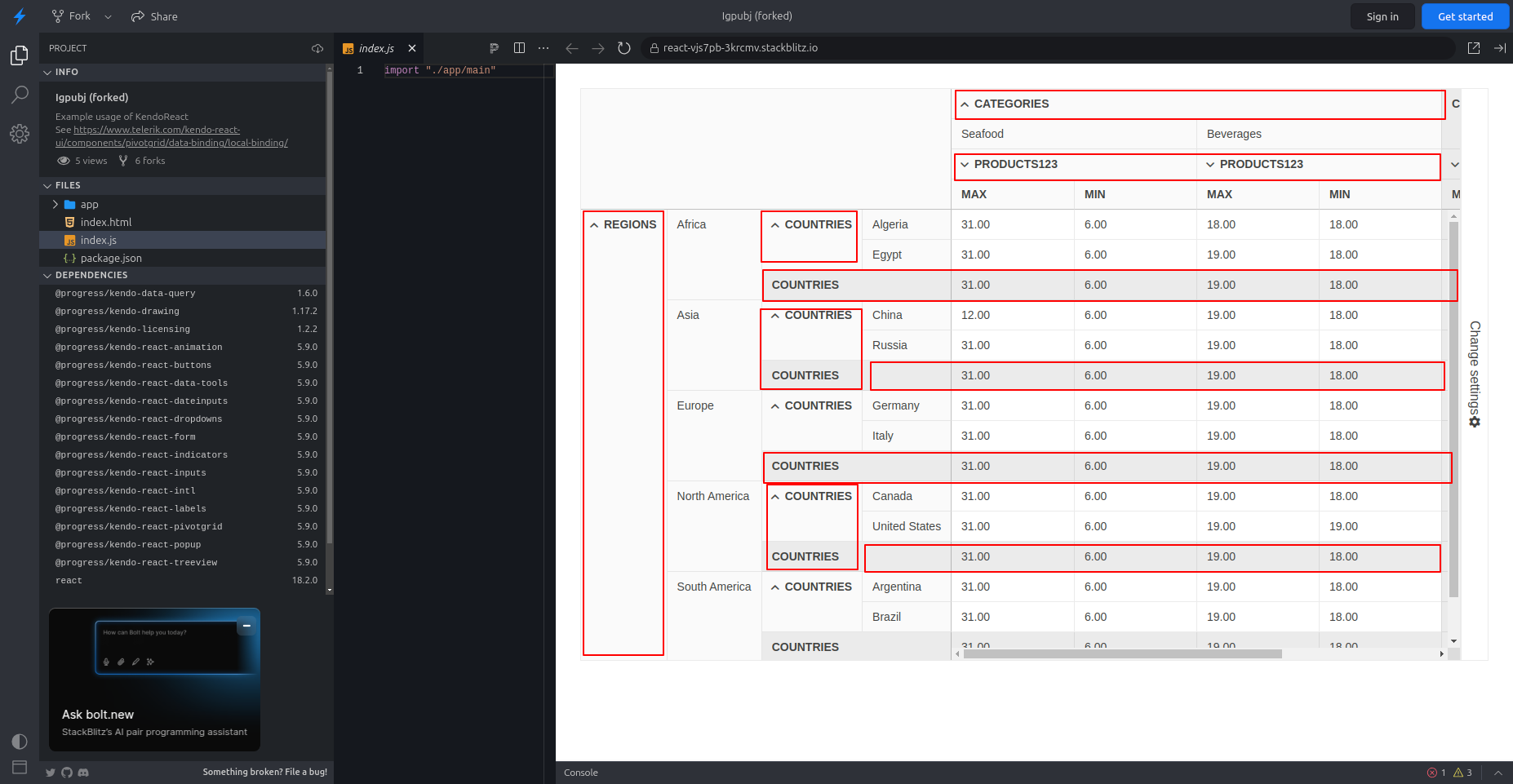

Jaskaran
Top achievements
 Rank 1
Rank 1
asked
on
19 Mar 2025
2 answers
71 views
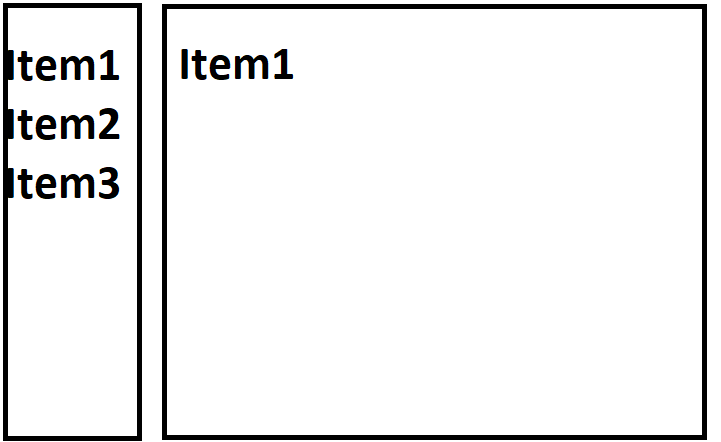
I have a Drawer component with 3 items.
Item1
Item2
Item3
Item1, Item2 should render insider DrawerContent
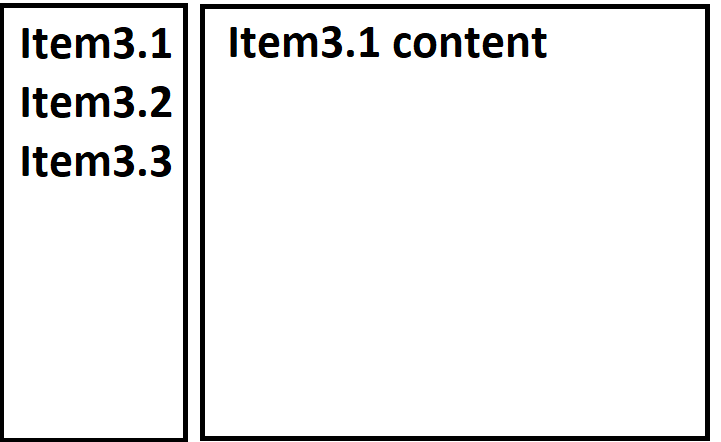
but on Item3 I want to load component that has its own routing, basicallly completily new component and new Drawer component
Kindly help.
Item1
Item2
Item3
Item1, Item2 should render insider DrawerContent
but on Item3 I want to load component that has its own routing, basicallly completily new component and new Drawer component
Kindly help.

Yanko
Telerik team

answered
on
18 Mar 2025
3 answers
83 views
Hello,
Is it possible to use the KendoReact Form component in a Dialog/Window so that a WindowActionsBar with buttons is placed at the bottom of the dialog?
At the moment, for the dialog to work correctly, it must consist of two blocks: <container/content><actions/WindowActionsBar>. In such a case, actions bar is glued to the bottom of the window.
Unfortunately, when using the KendoReact Form component, the entire form is in a single form block. The actions bar is treated as content and is not at the bottom of the screen.
Best,
Tomek
Is it possible to use the KendoReact Form component in a Dialog/Window so that a WindowActionsBar with buttons is placed at the bottom of the dialog?
At the moment, for the dialog to work correctly, it must consist of two blocks: <container/content><actions/WindowActionsBar>. In such a case, actions bar is glued to the bottom of the window.
Unfortunately, when using the KendoReact Form component, the entire form is in a single form block. The actions bar is treated as content and is not at the bottom of the screen.
Best,
Tomek
1 answer
89 views
Hi Team,
Combining Chart Series with Pattern-specific rendering. The requirement was to combine/group the chart items where one will be solid and the other will be pattern-specific. I created one sample, and it's working as expected.
Working Example - https://stackblitz.com/edit/react-hxpthdxt-yevr77he?file=app%2Fapp.jsx
I created one more sample for the test. If I pass the chart component on the page itself, then it's working fine, but when the chart props are passed to the global object, then it's throwing an error.
Failed to execute 'structuredClone' on 'Window': (e) => e.dataItem.chartColor could not be cloned.
Reference Example - https://stackblitz.com/edit/react-hxpthdxt-ufdubb7e
- The first chart is working, and the same code is defined on the second chart, but it's still breaking,
- And behind the chart, some additional background came up after an update of the versions.
Note - If you comment/delete the second-chart, then you can see the first-class chart render correctly.
Versions Used -
    "@progress/kendo-react-charts": "^9.5.0",
    "react": "^16.14.0",
Please look into it as soon as possible.
Thanks,
Mahesh
Filip
Telerik team
answered
on
14 Mar 2025
1 answer
89 views
Version:
@progress/kendo-react-grid: 9.4.1
When using the nagivatable and filterable props on KendoReact's Grid component, the automatically rendered, the input elements for default filter cells are no longer in the tab order. However, the elements for custom filter cells are in the tab order, as expected.
Please see this stackblitz demo:
https://stackblitz.com/edit/react-ts-wzme7qjm?file=App.tsx
https://react-ts-wzme7qjm.stackblitz.io
This behavior appears to also be the case on KendoReact 10.0.0.
Is there a known work-around to ensure that the Input components for automatically rendered, default filter cells, are in the tab-order and are tab-focusable? If not, is this a known issue, and a plan to resolve this?
@progress/kendo-react-grid: 9.4.1
When using the nagivatable and filterable props on KendoReact's Grid component, the automatically rendered, the input elements for default filter cells are no longer in the tab order. However, the elements for custom filter cells are in the tab order, as expected.
Please see this stackblitz demo:
https://stackblitz.com/edit/react-ts-wzme7qjm?file=App.tsx
https://react-ts-wzme7qjm.stackblitz.io
This behavior appears to also be the case on KendoReact 10.0.0.
Is there a known work-around to ensure that the Input components for automatically rendered, default filter cells, are in the tab-order and are tab-focusable? If not, is this a known issue, and a plan to resolve this?
Yanko
Telerik team
answered
on
14 Mar 2025
1 answer
90 views
Hello,
I need a draggable modal window with a KendoReact Form. What is the best way to set focus to the selected input?
Right now I'm using the Window component (because it's draggable) with the modal={true} option. Unfortunately, the Window component doesn't have an autoFocusedElement prop, which the Dialog component does.
Best,
Tomek

3 answers
66 views
Problem: DataResult isn’t supported
Why do we complain about this:
We want to use virtual scroll functional, but without DataResult support we have to load all items at once (data is pretty massive), which produce unnecessary overload of network.
Does it supported by other components or implementations: Angular TreeList, React Grid
Question: Do you plan to introduce DataResult support for React TreeList in closest feature
Ina
Telerik team
answered
on
12 Mar 2025
1 answer
73 views
I have an App that uses a barcode scanner and interacts with a website using a webview control. The scanner does not use a keyboard wedge to return data - it uses a callback function to pass the scanned barcode data into the website (built using React and Telerik controls).
In order to provide a target for the barcode data, the user must click the editable control (to place the focus on the control) so that the scanned barcode text is then placed in that control. For a text box, this is a trivial matter, but for a dropdown list this seems to be more complex. When a user selects the dropdown list, the list opens up complete with the search box. Is there a programmatic way of populating that search box with the text obtained from the barcode scan? I have even tried directly manipulating the DOM to try to set the inner text property, but without success.
Thanks in advance
Mike

Plamen
Telerik team
answered
on
07 Mar 2025
1 answer
151 views
I'm trying to add a simple expansion panel to my page. I need to use extra-large chevron-up down expand and collapse icons. I've tried creating an SvgIcon react element and setting its size that way, but I get a typescript error saying the element is missing the name. Is there a simple way to change the expand and collapse svg icon sizes on an ExpansionPanel? This is something I've tried so far:
const expandIcon = (
	<SvgIcon className="k-mb-xs k-mx-sm" icon={chevronUpIcon} size="xxlarge" />
);

return (
	<ExpansionPanel
		title={title}
		expanded={expanded}
		expandSVGIcon={expandIcon}
		onAction={(event) => {
			setExpanded(!event.expanded);
		}}
	>
		<span />
		<Reveal>
			{expanded && <ExpansionPanelContent>{children}</ExpansionPanelContent>}
		</Reveal>
	</ExpansionPanel>
);
Hetali
Telerik team
answered
on
06 Mar 2025













