or
0 answers
125 views
Hi,
I'm using kendo grid in angular. I'm trying to hide/remove the total cell from the kendo grid using *ngIf, but only content inside the cell is hiding, empty cell is showing.
How to hide the total cell from the grid,
This is the code , I have used
<kendo-grid id="antibiotic-result-view" [data]="uniqAntibioticList" [resizable]="false">
    <kendo-grid-column field="Expansion" [width]="150">
        <ng-template kendoGridHeaderTemplate let-column let-columnIndex="columnIndex">
            <div class="antibiotic-heading">{{"Antibiotic" | translate}}
                <mat-checkbox type="checkbox" [ngModel]="allCompleted" disabled="true"></mat-checkbox>
            </div>
        </ng-template>
        <ng-template kendoGridCellTemplate let-dataItem let-rowIndex="rowIndex">
            <div *ngIf="dataItem.IsSuppressed">
                <span>{{ dataItem.Expansion }}</span>
                <mat-checkbox type="checkbox" [ngModel]="dataItem.IsSuppressed" disabled="true"></mat-checkbox>
            </div>
        </ng-template>
    </kendo-grid-column>
</kendo-grid>
I have been trying for past 2 days, could someone help me on this ?

Kathiravan
Top achievements
 Rank 1
Rank 1
asked
on
22 Mar 2024
1 answer
416 views
VM4083:1 ERROR DOMException: Failed to execute 'setAttribute' on 'Element': 'aria-disabled]' is not a valid attribute name.
at NoneEncapsulationDomRenderer.setAttribute , i have this error when i try to open tabstrip component whit dialog on angular 17.3.0
at NoneEncapsulationDomRenderer.setAttribute , i have this error when i try to open tabstrip component whit dialog on angular 17.3.0
<kendo-tabstrip>
<kendo-tabstrip-tab title="Tab 1">
<ng-template kendoTabContent>
<p>Tab 1 Content</p>
</ng-template>
</kendo-tabstrip-tab>
<kendo-tabstrip-tab title="Tab 2" [selected]="true">
<ng-template kendoTabContent>
<p>Tab 2 Content</p>
</ng-template>
</kendo-tabstrip-tab>
<kendo-tabstrip-tab title="Tab 3">
<ng-template kendoTabContent>
<p>Tab 3 Content</p>
</ng-template>
</kendo-tabstrip-tab>
</kendo-tabstrip>

Yanmario
Telerik team

answered
on
21 Mar 2024
0 answers
178 views
Hi All,
We recently have undertaken an effort to upgrade our project to Angular 16 and as part of that we also updated all of our Kendo libraries to 14.2.0. Since the update, many of our datepicker inputs are behaving extremely strangely, namely, you open the datepicker and it starts frantically scrolling into the past without stopping. I'll attach a gif showing the issue.
Strangely I can't seem to reproduce it consistently, it happens on our test server every single time but not on my local machine. Here is an example of how the datepicker looks in code, though it happens across many of them in the application:
            <kendo-datepicker
              class="w-100"
              [value]="getDateTimeValue()"
              [format]="'MM/dd/yyyy'"
              [disabled]="valueCanBeEmpty()"
              (valueChange)="handleDatePickerValueChanged($event)"
              [popupSettings]="{appendTo: 'component'}"
              [attr.data-qa-id]="'datepicker-value-'+field.SourceName">
            </kendo-datepicker>
Any help would be appreciated
Timothy
Top achievements
Rank 1
Rank 1
asked
on
20 Mar 2024
0 answers
124 views
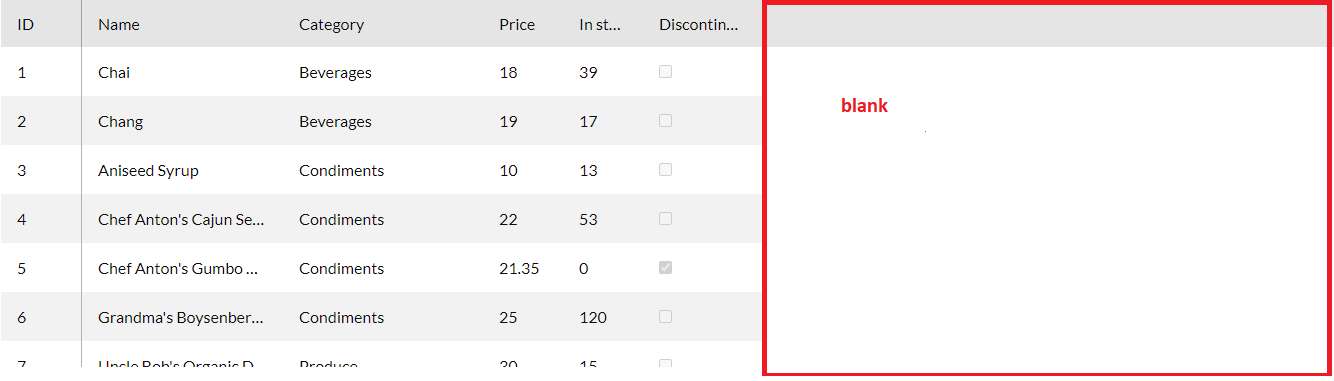
When I use the "locked" property on one of my grid columns, the half of the table is half blank.
I noticed that if my grid doesn't have this property, the "width" of each column behaves like "min-width", but when using "locked" in some of the columns, the "width" stays exactly with the exact value of the column instead of still function as "min-width" which causes half of the table to be blank.
To remove the blank half of my "grid" I need to pass a "width" value to the grid, but I believe this is not ideal, as I want my table to have 100% "width", in the example of "locked" documentation the grid is very small (https://www.telerik.com/kendo-angular-ui/components/grid/columns/locked/) so that it works without this problem of half being blank.
Is there a way to use the "locked" property so that half of my grid is not white? And that my grid has 100% "width"?
This problem with "locked" makes it unfeasible to use it in our project.
I left it on stackblitz as an example (To see the problem, use a large screen):
1 - the first Grid does not use "locked" so my columns adapt according to the space
2 - in the second Grid with a locked column, there is a blank space on the right side, and the columns become smaller (now respecting the width, instead of using it as "min-width")
link: stackblitz
I noticed that if my grid doesn't have this property, the "width" of each column behaves like "min-width", but when using "locked" in some of the columns, the "width" stays exactly with the exact value of the column instead of still function as "min-width" which causes half of the table to be blank.
To remove the blank half of my "grid" I need to pass a "width" value to the grid, but I believe this is not ideal, as I want my table to have 100% "width", in the example of "locked" documentation the grid is very small (https://www.telerik.com/kendo-angular-ui/components/grid/columns/locked/) so that it works without this problem of half being blank.
Is there a way to use the "locked" property so that half of my grid is not white? And that my grid has 100% "width"?
This problem with "locked" makes it unfeasible to use it in our project.
I left it on stackblitz as an example (To see the problem, use a large screen):
1 - the first Grid does not use "locked" so my columns adapt according to the space
2 - in the second Grid with a locked column, there is a blank space on the right side, and the columns become smaller (now respecting the width, instead of using it as "min-width")
link: stackblitz
0 answers
206 views
I had a customer who would like us to make 'Enter' work similar to Tab for moving across consecutive fields. For that I built a directive to tag onto various open fields where it was applicable (ie. inputs, textareas, kendo-dropdownlist, kendo-dateinput, just avoiding multicolumncombobox because that requires Enter as part of it's functioning).
What I've noticed is this will work for inputs, textareas, even kendo-dropdownlists, but it seems like for kendo-dateinput it will never 'tab' onto or out of those. Here's an example of both the directive and the fields I'm talking about living in the wild:
import { Directive, HostListener, ElementRef } from '@angular/core';
@Directive({
selector: '[tab13]'
})
export class Tab13Directive {
constructor(private el: ElementRef) { }
@HostListener('keydown', ['$event'])
onKeyDown(event: KeyboardEvent) {
if (event.key === 'Enter') {
event.preventDefault();
const nextElement = this.findNextFocusableElement();
if (nextElement) {
nextElement.focus();
}
}
}
private findNextFocusableElement(): HTMLElement | null {
const tab13Elements = document.querySelectorAll('[tab13]');
const currentIndex = Array.from(tab13Elements).indexOf(this.el.nativeElement);
for (let i = currentIndex + 1; i < tab13Elements.length; i++) {
if (this.isFocusable(tab13Elements[i] as HTMLElement)) {
return tab13Elements[i] as HTMLElement;
}
}
return null;
}
private isFocusable(element: HTMLElement): boolean {
return (
element.hasAttribute('tab13')
);
}
}
HTML example:
<div style="width: 100%; display: flex; flex-wrap: wrap; white-space: nowrap;">
<input tab13 id="{{ '0-qs-code' }}" tabindex="{{'120007'}}" />
<input tab13 id="{{ '0-qs-email' }}" tabindex="{{'120008'}}" />
<kendo-dateinput tab13 id="{{ '0-qs-rfqsent' }}" tabindex="{{'120009'}}" format="M/d/yy" placeholder="M/d/yy"></kendo-dateinput>
<kendo-dateinput tab13 id="{{ '0-qs-rfqrec' }}" tabindex="{{'120010'}}" format="M/d/yy" placeholder="M/d/yy"></kendo-dateinput>
<input tab13 id="{{ '0-qs-quoteno' }}" tabindex="{{'120011'}}" />
</div>
The tab works across all of these but for reasons I'm unfamiliar with the tab13 selector fails at 0-qs-email when the next input is a kendo-dateinput and it fails in 0-qs-rfqsent but it will work from 0-qs-rfqrec because the next selector is an input rather than a kendo-dateinput.
I'm hoping to up my product knowledge a bit and get a better grasp of what the kendo-dateinput is doing under the hood that might explain this behavior and what workarounds might be available for improving the directive.
What I've noticed is this will work for inputs, textareas, even kendo-dropdownlists, but it seems like for kendo-dateinput it will never 'tab' onto or out of those. Here's an example of both the directive and the fields I'm talking about living in the wild:
import { Directive, HostListener, ElementRef } from '@angular/core';
@Directive({
selector: '[tab13]'
})
export class Tab13Directive {
constructor(private el: ElementRef) { }
@HostListener('keydown', ['$event'])
onKeyDown(event: KeyboardEvent) {
if (event.key === 'Enter') {
event.preventDefault();
const nextElement = this.findNextFocusableElement();
if (nextElement) {
nextElement.focus();
}
}
}
private findNextFocusableElement(): HTMLElement | null {
const tab13Elements = document.querySelectorAll('[tab13]');
const currentIndex = Array.from(tab13Elements).indexOf(this.el.nativeElement);
for (let i = currentIndex + 1; i < tab13Elements.length; i++) {
if (this.isFocusable(tab13Elements[i] as HTMLElement)) {
return tab13Elements[i] as HTMLElement;
}
}
return null;
}
private isFocusable(element: HTMLElement): boolean {
return (
element.hasAttribute('tab13')
);
}
}
HTML example:
<div style="width: 100%; display: flex; flex-wrap: wrap; white-space: nowrap;">
<input tab13 id="{{ '0-qs-code' }}" tabindex="{{'120007'}}" />
<input tab13 id="{{ '0-qs-email' }}" tabindex="{{'120008'}}" />
<kendo-dateinput tab13 id="{{ '0-qs-rfqsent' }}" tabindex="{{'120009'}}" format="M/d/yy" placeholder="M/d/yy"></kendo-dateinput>
<kendo-dateinput tab13 id="{{ '0-qs-rfqrec' }}" tabindex="{{'120010'}}" format="M/d/yy" placeholder="M/d/yy"></kendo-dateinput>
<input tab13 id="{{ '0-qs-quoteno' }}" tabindex="{{'120011'}}" />
</div>
The tab works across all of these but for reasons I'm unfamiliar with the tab13 selector fails at 0-qs-email when the next input is a kendo-dateinput and it fails in 0-qs-rfqsent but it will work from 0-qs-rfqrec because the next selector is an input rather than a kendo-dateinput.
I'm hoping to up my product knowledge a bit and get a better grasp of what the kendo-dateinput is doing under the hood that might explain this behavior and what workarounds might be available for improving the directive.



0 answers
94 views
Hello,
I have a kendo grid with many columns and virtualcolumns set to true. I would like to know how to have the horizzontal scroll working while selecting cells with drag enable in order to select cells that are outside of the portion of grid visible in the screen. I've noticed that if I set drag to false the scroll works but then I'm not able to select multiple cells with the mouse. Thanks
GIUSEPPE
Top achievements
Rank 1
Rank 1
asked
on
14 Mar 2024
1 answer
486 views
Is it possible to do nested grouping in a grid? And I don't mean a column grouping. Like handling a case where the grid can do a
file1
file2
folder1
  file3
  folder2
    folder3
      folder4
        file4
        file5
And do we have some sample code if this is possible?
Thanks!
J
Zornitsa
Telerik team
answered
on
14 Mar 2024
0 answers
112 views
I have a custom control type in a toolbar container (a simple input text box); inside the input box the arrow keys do not work.
Upon investigation I discovered that the problem is related to toolbar navigation (it adds a listener to the keydown event and overrides the arrow keys), so is there a method to avoid this? I though there was a property like navigable to enable or disable this feature.
I found a workaround, but it's almost a hack because it accesses private variables:
inside aferviewInit of toolbar's the parent i call 😱
toolbar["toolbarKeydownListener"]()
to remove the listener, it works until you change the listener name.
i did an example
https://stackblitz.com/edit/angular-ubjvvg?file=src%2Fapp%2Fcustom-tool.component.ts,src%2Fapp%2Fapp.component.ts
Greetings
0 answers
104 views
I have an angular project that has a kendo grid that needs to be exported into PDF. Kendo grid has an expanded details per specific items when conditions met.
As can see below, I need to make the parent row to be together with its expanded detail when the page breaks. How can I achieve it?
Appreciate the response about my inquiry.
Thank you!
Yadabase
Top achievements
Rank 1
Rank 1
asked
on
13 Mar 2024
2 answers
1.2K+ views
I am having an issue with compiling angular (webpack) after adding @progress/kendo-angular-pdfviewer@14.3.0. It is referencing pdfjs-dist in the error. I do not see anywhere in the Getting Started > Dependencies about pdfjs-dist being needed. The StackBlitz demo does not contain that library either. When I try adding the pdfjs-dist module (either latest 4.0 or earlier 3.11), more errors occur related to pdfjs-dist. My tsconfig.json compilerOptions has module=es2020 and target=es2022. I do not have issues with any other @progress/kendo-angular-xxxxxx modules, and the @progress/kendo-license is included. Here is the error without pdfjs-dist module installed:
ERROR in ./node_modules/@progress/kendo-angular-pdfviewer/fesm2020/progress-kendo-angular-pdfviewer.mjs 17:0-43Module not found: Error: Can't resolve 'pdfjs-dist/build/pdf.worker.entry' in '[path to project]\node_modules\@progress\kendo-angular-pdfviewer\fesm2020'
Did you mean 'pdf.worker.entry.js'?
BREAKING CHANGE: The request 'pdfjs-dist/build/pdf.worker.entry' failed to resolve only because it was resolved as fully specified
(probably because the origin is strict EcmaScript Module, e. g. a module with javascript mimetype, a '*.mjs' file, or a '*.js' file where the package.json contains '"type": "module"').
The extension in the request is mandatory for it to be fully specified.
Add the extension to the request.
resolve 'pdfjs-dist/build/pdf.worker.entry' in '[path to project]\node_modules\@progress\kendo-angular-pdfviewer\fesm2020'
Parsed request is a module
using description file: [path to project]\node_modules\@progress\kendo-angular-pdfviewer\package.json (relative path: ./fesm2020)
Field 'browser' doesn't contain a valid alias configuration
resolve as module











